
不作过多介绍,了解更多推荐到https://imququ.com/那,这个···反正我反复看了好几遍···
首先这里有一个坑:阿里ECS是无法连接上ct.googleapis.com,也就是说无法提交pem到Google的服务器而获取获取SCT文件,目前,我的解决方法是用国外的vps提交,然后得到sct再上传到ECS上,然后restart一下Nginx就解决了。
先上效果图
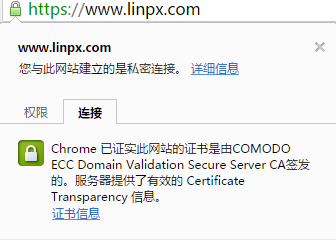
本教程,基于阿里云ECS和CentOS 7.x,其他情况未作太多的测试
获取 SCT
安装Go
yum install golang下载ct-submit和编译它
cd /usr/src
wget https://github.com/grahamedgecombe/ct-submit/archive/v1.0.0.tar.gz
tar -xzvf v1.0.0.tar.gz
cd ct-submit-1.0.0
go build
编译成功后,当前目录会出现名为 ct-submit-1.0.0 的可执行文件,执行提交
提交之前需要串联一下证书,这里需要串联的证书是站点证书和中间证书,不需要根证书。
cat www_linpx_com.crt COMODOECCDomainValidationSecureServerCA.crt COMODOECCAddTrustCA.crt > chained.pem我是把这个 chained.pem 放到了 /usr/local/nginx/conf/vhost/sslkey/ 这个目录下
然后再新建一个目录 /usr/local/nginx/conf/vhost/sct/ ,用来存放接下来提交后所获取的SCT文件
进入刚刚编译的 ct-submit-1.0.0 目录,执行提交
./ct-submit-1.0.0 ct.googleapis.com/aviator </usr/local/nginx/conf/vhost/sslkey/chained.pem >/usr/local/nginx/conf/vhost/sct/aviator.sct

./ct-submit-1.0.0 ct.googleapis.com/pilot </usr/local/nginx/conf/vhost/sslkey/chained.pem >/usr/local/nginx/conf/vhost/sct/pilot.sct

./ct-submit-1.0.0 ct.googleapis.com/rocketeer </usr/local/nginx/conf/vhost/sslkey/chained.pem >/usr/local/nginx/conf/vhost/sct/rocketeer.sct

./ct-submit-1.0.0 ct1.digicert-ct.com/log </usr/local/nginx/conf/vhost/sslkey/chained.pem >/usr/local/nginx/conf/vhost/sct/digicert.sct
以上代码分别向 Google 和 Digicert 的服务器提交了证书,但Google是提交不了,因为阿里ECS无法连接上Google,需要自己弄一台国外的vps再提交在获取后放到你自己的阿里ECS上。
加入 CT 模块
因为之前已经弄过给Nginx上OpenSSL 1.0.2+,可以看这篇文章:https://www.linpx.com/p/nginx-chacha20poly1305-encryption-suite.html 和 这篇文章: https://www.linpx.com/p/the-openssl-chacha20poly1305-cipher-suite.html ,这里不再过多介绍,但加入CT模块需要OpenSSL 1.0.2+的支持
cd /usr/src
wget https://github.com/grahamedgecombe/nginx-ct/archive/v1.2.0.tar.gz
tar -xzvf v1.2.0.tar.gz
然后下载Nginx1.9.12
wget http://nginx.org/download/nginx-1.9.12.tar.gz
tar -xzvf nginx-1.9.12.tar.gz
查看自己的Nginx的configure arguments有哪些,下一步的安装编译需要用到
nginx -V复制configure arguments的内容,在./configure后面带上你复制的内容,然后别忘了加上--add-module=/usr/src/nginx-ct-1.2.0,然后执行
cd nginx-1.9.12
make clean
./configure --prefix=/usr/local/nginx --user=www --group=www --with-openssl=/usr/src/openssl-1.0.2g --add-module=/usr/src/nginx-ct-1.2.0 --with-http_stub_status_module --with-http_v2_module --with-http_ssl_module --with-ipv6 --with-http_gzip_static_module --with-http_realip_module --with-http_flv_module --with-ld-opt="-ljemalloc"
make && make install
修改配置
假设配置文件是在 /usr/local/nginx/conf/vhost 的目录
vim /usr/local/nginx/conf/vhost/www.linpx.com.conf在server{}的括号内加入
ssl_ct on;
ssl_ct_static_scts /usr/local/nginx/conf/vhost/sct;注意:/usr/local/nginx/conf/vhost/sct 替换为你的sct文件的存放目录就可以了
配置完后请记得重启Nginx!
systemctl restart nginxOk,至此,给HTTPS证书启用Certificate Transparency策略算是完成了,接下来就开始前端知识的复习和数据结构的内容了。希望大家多多关注我的博客,也希望你们能从我的博客学到东西,另外转载记得带上处处,谢谢。
本文由 Chakhsu Lau 创作,采用 知识共享署名4.0 国际许可协议进行许可。
本站文章除注明转载/出处外,均为本站原创或翻译,转载前请务必署名。
出色的 出行资源! 请继续保持! 巴伐利亚秘境 我一直梦想, 能像你们一样多旅行。很开心。
我喜欢, 充满真情实感。你的网站 就是 这样的。请继续。 阿灵顿排屋 我常常想, 能像你们一样多旅行。超级内容。
我喜欢 旅游博客。太棒了了解路线。 南匈牙利 我珍视, 这里分享真实经验。你的博客 就是 关于这些的。请继续。
令人惊叹的 关于旅行的门户! 请继续保持! 遊樂設施 我很少遇到, 这么鲜明的文字。谢谢。
素材精彩极了。由衷感谢 带来的灵感。 橋連河道 万分感谢 灵感。格外 很有意思。
大兄弟,我发现一个可以生成证书链的工具,
https://whatsmychaincert.com
证书链一个cat命令就可以搞定了。